Getting Plex Hardware Transcoding Working on the Ugreen DXP4800 Pro
I picked up a Ugreen DXP4800 Pro NAS earlier this year. It’s a 4-bay unit with an Intel Core i3-1315U, 10GbE + 2.5GbE LAN, and dual M.2 NVMe SSD slots. I upgraded the RAM to 2x8GB DDR5-5600 SO-DIMMs (replacing the stock single stick) for 16GB total. The i3-1315U is a chip more commonly found in laptops than NAS enclosures, which turns out to matter a lot when you want to run Plex Media Server.
Getting hardware transcoding working wasn’t entirely straightforward. This post documents what actually happened, including a few non-obvious problems that wasted an afternoon.
Why Hardware Transcoding Matters
When every client on your network can play back a file directly - right codec, right resolution, right bitrate - Plex doesn’t need to do anything. In practice, that’s rarely the case. Browsers, phones on weak signals, older TVs: they all ask for something different. Plex handles this by transcoding on-the-fly.
Software transcoding is CPU-intensive. A single 1080p stream can pin a core; 4K HEVC source material is much worse. Hardware transcoding offloads encode and decode work to the GPU, which is built for it. The DXP4800’s iGPU handles transcodes that would saturate the CPU while barely registering in resource utilization.
The catch: hardware transcoding requires a Plex Pass subscription. It’s required, full stop.
Initial Setup - Docker Compose
Plex runs as a Docker container on the DXP4800. Here’s the starting compose file:
services:
  plex:
    image: plexinc/pms-docker:1.43.0.10492-121068a07
    container_name: plex
    network_mode: host
    devices:
      - /dev/dri:/dev/dri
    group_add:
      - 105
    volumes:
      - /volume2/NAS/Docker/Plex/config:/config
      - /volume2/NAS/Docker/Plex/transcode:/transcode
      - /volume2/NAS/Videos/Movies:/movies
      - /volume2/NAS/Videos/Shows:/shows
      - /volume2/NAS/Videos/Recordings:/recordings
    environment:
      - PLEX_UID=1000
      - PLEX_GID=10
      - TZ=America/Los_Angeles
    restart: unless-stopped
The devices line passes /dev/dri - the DRI (Direct Rendering Infrastructure) device - into the container. Without it, Plex can’t see the GPU. group_add: 105 grants the container access to the render group on the host, which owns /dev/dri/renderD128.
Or so I thought.
Problem 1: Missing the Video Group
Plex was running but not using the GPU. Time to check what was actually happening inside the container:
docker exec plex ls -la /dev/dri
crw-rw---- 1 root video  226,   0 Mar 15 12:15 card0
crw-rw---- 1 root video1 226, 128 Mar 15 12:15 renderD128
Two problems here. First, card0 is owned by the video group (GID 44 on the host) - and GID 44 wasn’t in my group_add list. Second, renderD128 was showing as owned by video1 inside the container - a label that doesn’t exist in the container’s /etc/group, just a display artifact for an unmapped GID.
To get the real GIDs on the host:
cat /etc/group | grep -E "video|render"
# video:x:44:
# render:x:105:

stat /dev/dri/renderD128
# Gid: (  105/  render)
Both GID 44 (video) and GID 105 (render) needed to be in group_add:
group_add:
  - "44"    # video → card0
  - "105"   # render → renderD128
This is the most common reason GPU transcoding silently doesn’t work on Linux Docker deployments. The error message is nothing - Plex falls back to software without telling you.
Problem 2: libusb_init Crash Loop
After fixing the groups and restarting, Plex started crash-looping:
plex  | Starting Plex Media Server.
plex  | [services.d] done.
plex  | Critical: libusb_init failed
plex  | Stopping Plex Media Server.
Newer versions of Plex try to initialize libusb to support connected tuners. If /dev/bus/usb doesn’t exist inside the container, it crashes. The fix is to pass it through in the devices block:
devices:
  - /dev/dri:/dev/dri
  - /dev/bus/usb:/dev/bus/usb
If the path doesn’t exist on the host at all:
mkdir -p /dev/bus/usb
Then add the mapping anyway - Plex just needs the path to exist so libusb can initialize without crashing.
Switching to the linuxserver.io Image
At this point I switched from the official plexinc/pms-docker image to the linuxserver.io Plex image. The practical difference: the lsio image explicitly validates DRI permissions at startup and tells you what it found:
plex  | **** permissions for /dev/dri/renderD128 are good ****
plex  | **** permissions for /dev/dri/card0 are good ****
No more guessing. It also handles UID/GID mapping more cleanly, which means the group_add workaround may not be needed at all with the lsio image - worth testing with it removed to keep the compose clean.
Plex Transcoder Settings
With the container configuration sorted, the relevant settings in Settings → Transcoder (click “Show Advanced”):
- Transcoder quality: Make my CPU hurt - with the GPU doing the heavy lifting, quality-at-max is fine
- Use hardware acceleration when available: ✅
- Use hardware-accelerated video encoding: ✅
- Hardware transcoding device: Intel Alder Lake-P [UHD Graphics] - select explicitly, not “Auto”
- Enable HEVC video encoding: Always - without this, Plex falls back to H.264 for all transcoded output, even when the client supports HEVC
- Enable HEVC Optimization: ✅
- Enable HDR tone mapping: ✅ - without this, HDR content transcoded to SDR will look washed out and dim
- Tonemapping algorithm: hable
The hable algorithm produces natural-looking results with good shadow detail and highlights that don’t clip aggressively. The initial HEVC setting was at “Never” - any HEVC encode was falling back to CPU entirely, which defeated much of the point.
Verifying It Actually Works
This is where things got confusing for longer than I’d like to admit.
The GPU Appears Idle
After getting everything configured, I checked system resource usage in the Ugreen UGOS Pro dashboard while a transcode was running. GPU utilization: flat zero.
The issue: system monitors typically only report 3D/render engine utilization. The video encode/decode pipeline runs on a separate hardware block - the VPU/media engine - that the system dashboard doesn’t surface. To actually see media engine activity:
sudo intel_gpu_top
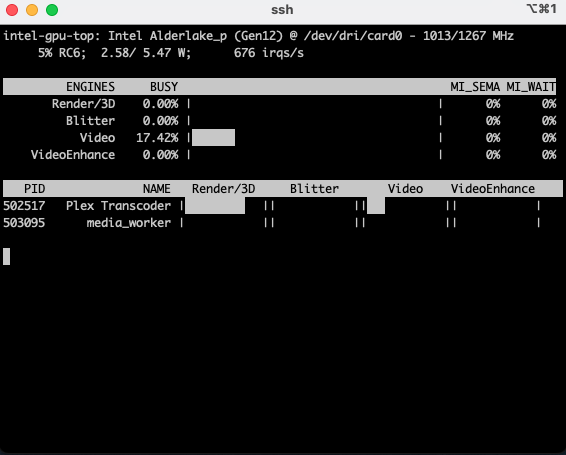
This breaks out the engines separately - Video, VideoEnhance, and Render as distinct rows. Transcoding lights up Video, not Render. If intel_gpu_top isn’t installed:
sudo apt install intel-gpu-tools
Here’s what it looks like during an active transcode - Video engine at 17%, Render at zero, with Plex Transcoder and media_worker both registered against the GPU:
Direct Stream Isn’t a Transcode
Even with intel_gpu_top running, the Video row stayed at zero during playback. Clicking the (i) info icon on the active session in the Plex web UI revealed the reason: videoDecision: copy.
Plex was doing a Direct Stream - repackaging the container to HLS without re-encoding the video. No decode/encode, no GPU work needed. This is actually the ideal outcome: Plex is smart enough to skip transcoding when the client can handle the format directly.
GPU transcoding only fires on a real re-encode. To force one: go into the player settings during playback and manually drop the quality (e.g., from Original to 720p). The session will show Transcode (hw) instead of Direct Stream, and the Video row in intel_gpu_top will spike immediately.
When a real transcode was running, the session report confirmed everything was working:
transcodeHwDecoding="vaapi"
transcodeHwEncoding="vaapi"
transcodeHwFullPipeline="1"
Full Intel VA-API hardware pipeline, both decode and encode.
Sloth Mode
Even during a confirmed transcode, intel_gpu_top showed the Video engine at zero most of the time. The reason is slothMode in the Plex transcoder logs. Plex pre-transcodes segments well ahead of playback, then throttles and waits for the player to catch up. Between bursts of encoding the GPU sits idle.
To catch the brief spikes, sample more frequently:
sudo intel_gpu_top -s 100
That samples every 100ms instead of 1 second, which is enough to catch the short encode bursts. Low-bitrate content (480p/1.5Mbps) is especially prone to this - the encode completes in milliseconds and the GPU goes right back to sleep.
Live TV Is Software Only
One limitation worth knowing: Plex’s live TV transcoding pipeline doesn’t use hardware acceleration. Even with VA-API working correctly for library content, live TV transcodes run entirely on CPU. The two code paths are separate and the live stream pipeline bypasses VA-API regardless of your settings. It’s a known Plex limitation.
Bonus: Background Optimization
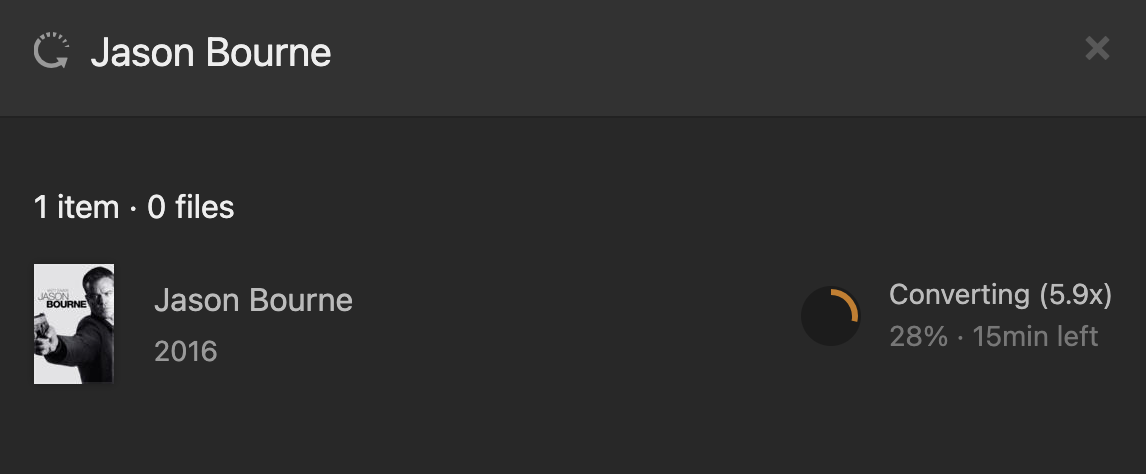
The hardware pipeline also powers Plex’s background media optimizer, which pre-converts your library to formats that direct play on all your devices. With the iGPU handling it, optimization runs at around 5-6x real-time speed without noticeably affecting system load:
Final Compose File
services:
  plex:
    image: lscr.io/linuxserver/plex:latest
    container_name: plex
    network_mode: host
    devices:
      - /dev/dri:/dev/dri
      - /dev/bus/usb:/dev/bus/usb
    volumes:
      - /volume2/NAS/Docker/Plex/config:/config
      - /volume2/NAS/Docker/Plex/transcode:/transcode
      - /volume2/NAS/Videos/Movies:/movies
      - /volume2/NAS/Videos/Shows:/shows
      - /volume2/NAS/Videos/Recordings:/recordings
    environment:
      - PUID=1000
      - PGID=10
      - TZ=America/Los_Angeles
      - VERSION=docker
    restart: unless-stopped
What Actually Worked
The DXP4800’s Intel iGPU is capable hardware for Plex transcoding. The setup friction was mostly Linux permissions and container configuration - none of it was specific to this NAS. The same issues would surface on any Docker-based Plex setup with an Intel iGPU.
The key things that made the difference:
- Both
video(GID 44) andrender(GID 105) groups ingroup_add- not just one /dev/bus/usbpassed through so libusb doesn’t crash Plex on startup- Switching to the linuxserver.io image for startup validation of DRI permissions
- Understanding that
intel_gpu_top- not generic system stats - is the right tool for verifying media engine activity - Actually forcing a real transcode to verify, since most playback from modern clients is Direct Stream